The problem
You are integrating with a third-party API. Over an afternoon you work out which headers it really needs, which query parameters matter, what the response looks like and which call has to come first to get a token. Then you move on, and three months later you need all of it again.
By then the knowledge is scattered: a few cURL commands in your shell history, a half-finished collection in a hosted API client, some notes in another app. None of it says what the response looked like, and none of it is in the repository next to the code that depends on it.
The usual way
Throwaway cURL commands, or a collection locked inside a hosted client with an account and a sync service, and your notes kept somewhere else.
With API Almanac
A project folder of readable YAML: the requests, their environments, what you expect back and why. Open it, pick a request, press Run.
API Almanac is deliberately not an enterprise API platform. Its README calls it a developer’s field notebook for APIs, with executable requests and response archaeology: it remembers the last response of every request, sketches its shape, and lets you write down what you learned right next to the call.
How it works
A project is an ordinary folder with an almanac.yaml at its root, one
file per environment and one file per request. Templates such as
{{base_url}} are filled in from the selected environment when you run a
request, and secrets are referenced as {{secret.API_TOKEN}}, which reads
an OS environment variable at run time, so the value never lands on disk.
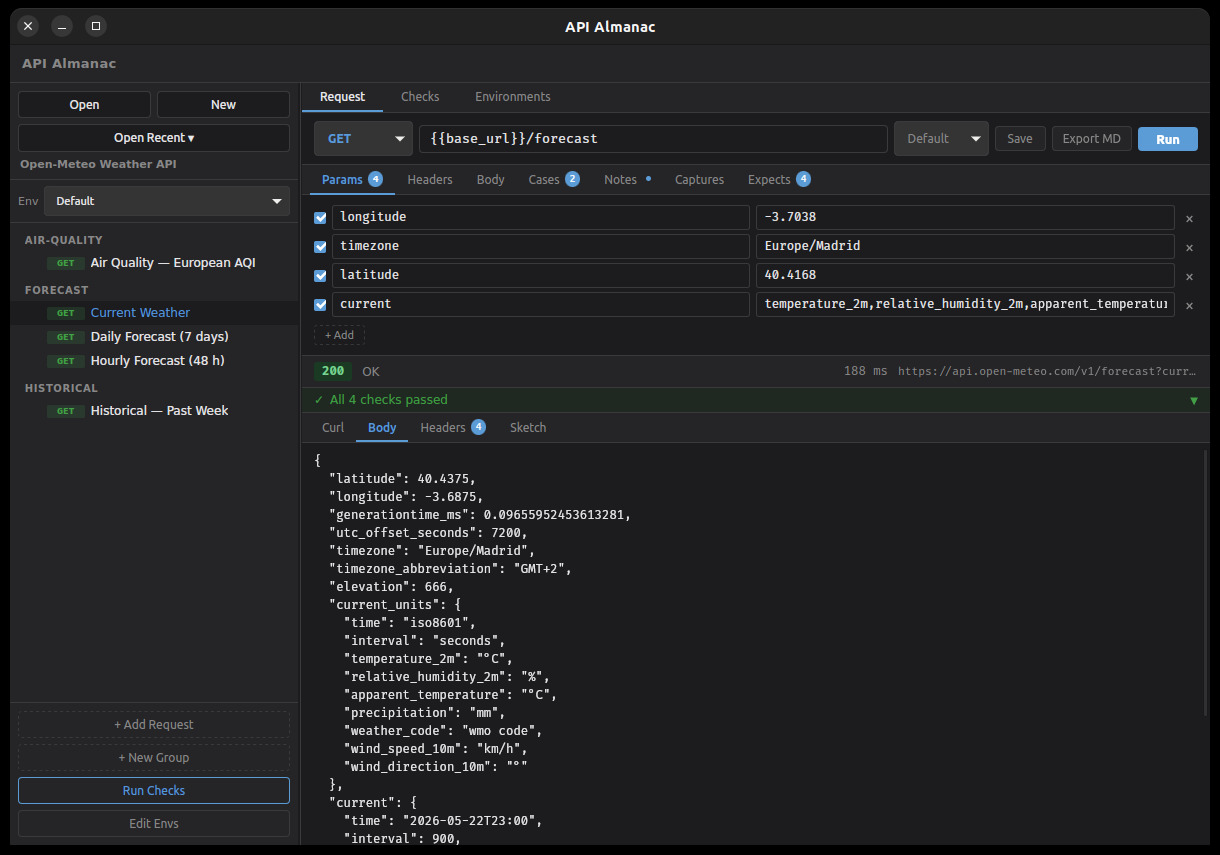
- OpenOpen a project folder, or start a new one. Requests appear in a sidebar, grouped by folder.
- ExploreEdit the method, URL, params, headers and body, choose an environment, and run it.
- KeepSave it with notes, expectations and captures. The YAML is what you commit.
Made to be revisited
Your project is just files
Plain YAML in folders you choose. Each request keeps a stable ID, so renames and reordering stay readable in a Git diff.
Know when an API changes
Expectations on status, response time, headers and JSON or XML fields run with every request and show pass or fail, with the expected and the actual value.
Chain calls without copy and paste
Captures pull values such as a token or a new ID out of a response into session variables for the next request. Cases switch between named sets of variables.
See the shape, not just the data
TypeSketch infers a short YAML summary of a response's structure. The last response of every request is saved and shown again when you reopen it.
Check everything in one go
The spot-check runner runs every request in order, carries captured values forward and exports a Markdown report. A dry run shows the resolved cURL command without sending anything.
Docs and tools from the same source
Export any request as a Markdown notebook, use the
almanac CLI in scripts, or plug in your own analyzer
written in any language that reads stdin.
What it supports today
API Almanac is early-stage software at version 0.0.1. It has no packaged releases yet, so you build it from source. It is a Tauri 2 desktop app with a Rust backend and a React front end, plus a separate command-line tool.
- Request bodies as JSON, XML, form data or plain text, with an editable tree view for JSON and XML
- Environments that inherit from a parent environment, and secrets read from OS environment variables
- Expectations, captures, cases and per-request notes, all editable in the app and stored in the request’s YAML
- Folder groups with drag-and-drop ordering, duplicate requests and recent projects
- Analyzer plugins: any external program that receives the request and response as JSON and returns HTML, YAML or Markdown
Some things are on the roadmap rather than in the app: only the latest
response of each request is kept (no history or response diff yet), and
there are no multi-request flows beyond the spot check, no keyring or
.env secret backend, and no OpenAPI import. The project format is
documented precisely enough for an AI agent to generate a whole project
from an API’s docs; the bundled demo was made that way.
Get started
1. Build and run the app
You need Rust (stable), Node.js 18 or later, and the Tauri prerequisites for your platform (webkit2gtk on Linux, WebView2 on Windows).
git clone https://github.com/arturormk/api-almanac-rust.git
cd api-almanac-rust
npm install
npm run tauri dev
The app window opens on its own. To build an installer instead, run
npm run tauri build; the result goes to
src-tauri/target/release/bundle/.
2. Open the demo project
Choose Open and pick the demos/open-meteo/ folder in the clone. It
covers the free Open-Meteo weather API, which
needs no key or account. Pick Current Weather, press Run, and look
at the response, its checks and the Sketch tab.
3. Try the CLI
The almanac binary works on the same project files. It looks for
almanac.yaml in the current folder and its parents:
cargo build -p api-almanac-cli
cd demos/open-meteo
alias almanac=../../target/debug/almanac

# List the requests in the project
almanac list

# Run one request by its ID
almanac run forecast.current-weather --env default

# Run every request in order, with checks
almanac spot-check --env default

# Write a Markdown notebook for a request to docs/
almanac export-md forecast.current-weather
4. Start your own project
A project needs only an almanac.yaml with an id and a name, an
environment file and a request file. Click New in the app, or copy the
demo and adapt it. To have an AI agent draft one from your API’s docs,
adapt the demo’s
generation prompt.
Learn more
- README: every feature, the file format with examples, expectation rules and the plugin interface.
- Project format reference: the complete YAML specification, written so that an AI agent can generate a valid project.
- Design blueprint: the product vision and milestone plan.
- Sample plugin: a small Python analyzer to start your own from.
- Issues: bug reports and feature requests.
API Almanac is dual-licensed under MIT or Apache-2.0, at your option.