The problem
You ask a coding agent such as Claude Code or Codex to make a change, and it starts editing files. You want to follow along: which files it touched, what it removed, whether that refactor went where you expected. You don’t want to go back to a GUI editor to do it.
The terminal options aren’t quite right. Running git diff over and over
misses untracked files and shows staged and unstaged changes separately.
watch git diff redraws from the top every time and loses your place. A
full Git client is built for staging and committing, which is exactly what
you don’t want to do by accident while someone else is driving.
The usual way
Re-run git status and git diff by hand,
scroll back to where you were, and remember to check the new files
separately.
With gitwatch
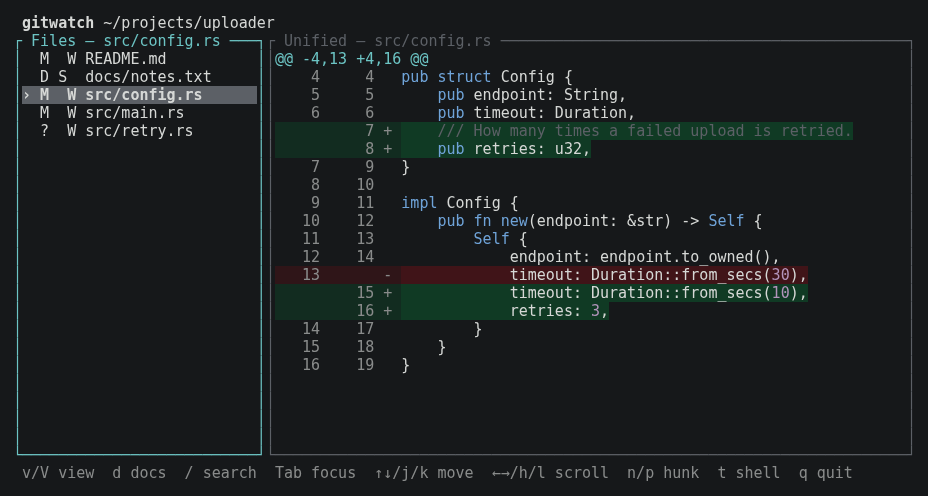
One pane that lists every changed file and shows its diff, refreshes a couple of seconds after the agent stops typing, and keeps your place while it does.
How it works
gitwatch compares the current HEAD with your working tree, so staged,
unstaged and untracked changes all appear together, once per file. It
watches the files for changes and refreshes after a short quiet period, with
a periodic Git check as a fallback for anything the notifications miss. When
the agent commits, those changes simply disappear from the list, and the
next edits start a clean slate.
- Open itRun
gitwatchin your repository, in a pane beside the agent. - Let the agent workChanged files appear on the left and their diffs on the right, updated automatically.
- Read and decideMove between files and hunks, switch to the full before or after file, then tell the agent what's next.
Made to sit beside an agent
Nothing to press
Refreshes wait for a 2-second pause in file activity, but never more
than 10 seconds while changes keep coming. r refreshes
straight away if you want it.
Keeps your place
Your selected file, view and scroll position survive refreshes. Git runs on a background thread, so the interface stays responsive while it does.
Three ways to read a change
Press v to switch between the unified diff and the
complete before and after files, with changed lines still highlighted
and your position kept.
Can't change your repository
It never stages, commits, resets, checks out or edits anything. Git runs only from a short list of query commands, without prompts, pagers, external diff tools or optional index locks.
The docs, too
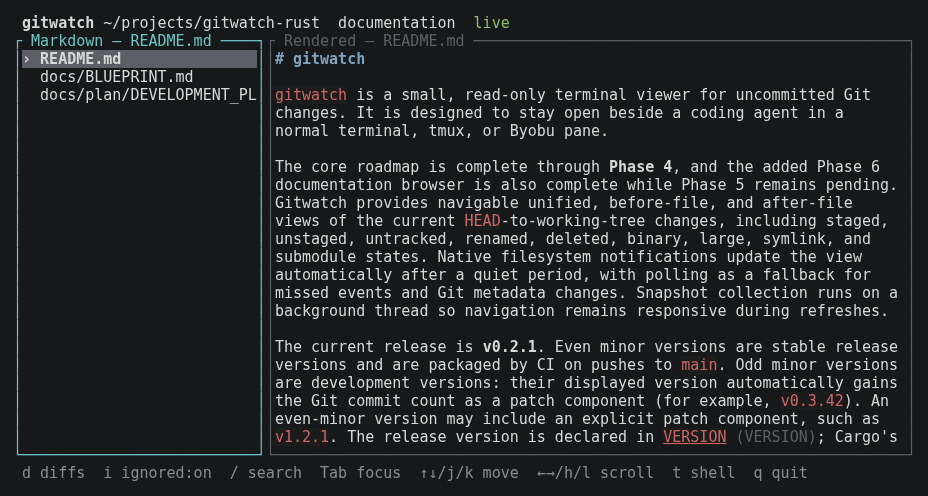
Press d to browse every Markdown file in the repository,
rendered in the terminal and reloaded when the agent edits it. Press
d again to return to the diffs.
Stays in the terminal
Vim-style keys and search, mouse clicks and scrolling, and
t for a quick shell at the repository root. No
configuration needed.
What it supports today
gitwatch is at version 0.2.1, a stable pre-1.0 release. The core viewer and
the documentation browser are complete; the hardening and acceptance work
planned before 1.0 (wider testing of worktrees, concurrent writes, profiling
and manual smoke tests) hasn’t started yet. It is built for Linux
terminals, including tmux and Byobu panes, and it uses the git command
already on your system.
- Modified, added, deleted, renamed and untracked files, including files with both staged and unstaged changes
- Binary files, files over 4 MiB, symlinks and submodules, each shown with a short explanation instead of unreadable content
- Repositories without a first commit, and running from a subdirectory
- Basic syntax colouring for Rust, C-family languages and languages with
#comments
It is deliberately only a viewer. There is no staging, committing,
history browsing, commit review or branch management, and it is not meant to
compete with Lazygit or GitUI. Changed files are shown as a flat list of
paths rather than a collapsible tree, and there are no theme or
configuration files. There are no published binaries yet: you build it from
source, optionally as a .deb or .rpm package.
Get started
1. Build it
You need Git and a stable Rust toolchain (1.88 or newer):
git clone https://github.com/arturormk/gitwatch-rust.git
cd gitwatch-rust
# Build the release executable
./quickstart.sh exe
sudo cp target/release/gitwatch /usr/local/bin/
Or build a package instead. ./quickstart.sh deb needs dpkg-deb, and
./quickstart.sh rpm needs rpmbuild; both write to target/packages/:
./quickstart.sh deb
sudo apt install ./target/packages/gitwatch_*.deb
2. Run it beside your agent
Open a second terminal or tmux pane and start gitwatch inside your project, or point it at one:
cd ~/projects/uploader
gitwatch

# Or from anywhere
gitwatch ~/projects/uploader
3. Find your way around
j/kor the arrow keys move, andTabswitches between the file list and the diff.n/pjump to the next or previous hunk.v/Vcycle through the unified, before and after views./searches the right pane;n/Nstep through matches.dtoggles the documentation browser, andtopens a shell (typeexitto come back).qquits.
If the default timings don’t suit you, change them at startup:
gitwatch --quiet-ms 1000 --max-delay-ms 5000
Learn more
- README: every key, the refresh timings, packaging and the versioning scheme.
- Blueprint: the product definition, including the read-only guarantee and explicit non-goals.
- Development plan: the architecture, the phases and their status, and what is deferred.
- Issues: bug reports and feature requests.
gitwatch is MIT licensed. It runs your system’s Git as a separate program under its own licence.