The problem
You look after a few dozen machines: some servers, a lab, a couple of
customer sites behind a bastion. What you know about reaching them is spread
across ~/.ssh/config, a notes file, your shell history and your memory.
Which key goes with which customer? Which box is only reachable through the
gateway? What was the forward you needed for that web admin page?
Hand-edited SSH config doesn’t give you folders, search or notes, and it gets awkward as soon as you move between a laptop, a workstation and a field machine whose keys live in different places. The usual alternatives are hosted SSH managers with an account, a sync service and their own SSH implementation, which is more than you wanted to hand over.
The usual way
A long ~/.ssh/config, notes elsewhere, and a hosted
client if you want a nicer interface, with your inventory on someone
else's server.
With StaSSH
One local workspace with folders, tags, notes and search, a choice of
terminal or desktop interface, and plain ssh doing the
actual connecting.
StaSSH doesn’t try to hide SSH. It organizes your hosts, then generates the
OpenSSH command (or a temporary OpenSSH config for jump chains and forwards)
and runs the ssh already on your system. Your agent, hardware keys,
known-hosts checks and password prompts all keep working exactly as before,
and you can always see the command it is about to run.
How it works
Your workspace lives in ~/.ssh/stassh/. The portable part, vault.json,
holds folders, hosts, jump chains, forwards, tags, notes and actions. Keys
are referred to by fingerprint, and a small machine-local file says where
each key lives on this computer. Copy or sync the folder with whatever
tool you already use, and the same workspace works on the next machine.
- ImportCreate a vault and import your existing
~/.ssh/config, including nestedIncludefiles. - OrganizeSort hosts into folders, add notes and tags, set identities, jump hosts and forwards.
- ConnectPick a host in the TUI or GUI, or script it from the CLI. OpenSSH does the rest.
Built for many hosts
Three ways in, one workspace
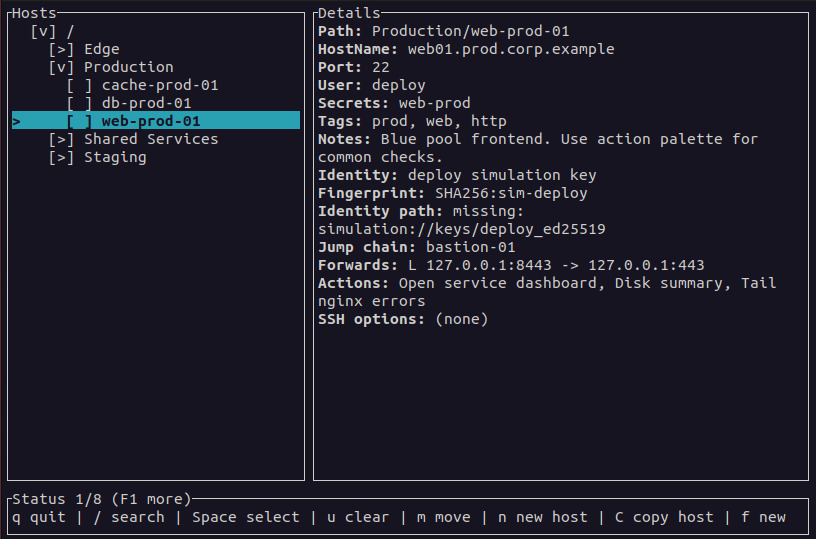
The stassh CLI for scripts (with JSON output), a keyboard-driven
terminal UI, and a desktop GUI. All three read and write the same vault.
Nothing between you and OpenSSH
Connections use the system ssh. The GUI shows a copy-and-paste
command preview, and stassh diagnose shows what will be resolved.
Reusable actions
Define a workflow once, such as "forward a port, start x11vnc,
open the viewer" or "send a file with scp", and run it on any host.
Dry-run shows the exact plan first.
Many sessions at once
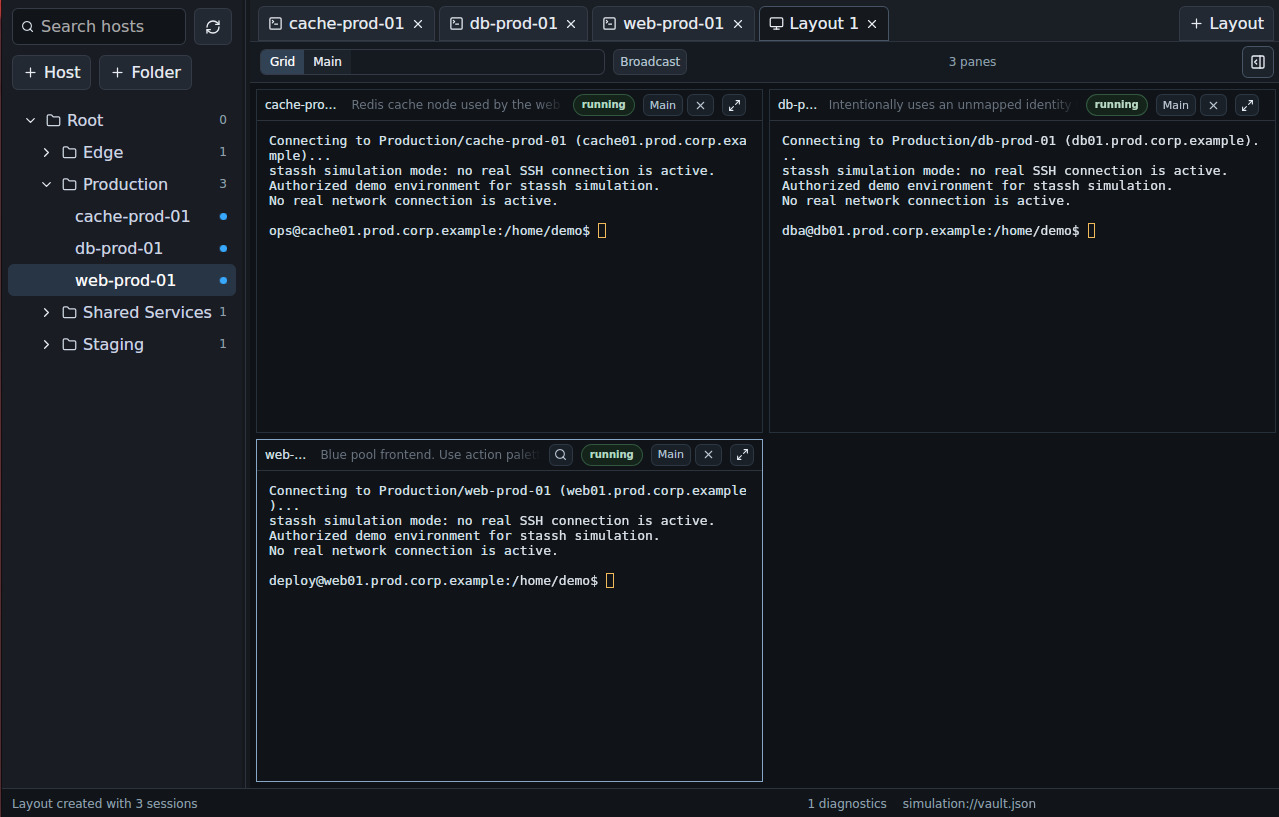
The GUI keeps sessions in tabs and arranges them in grid or main-pane layouts, with optional broadcast input. The TUI opens hosts in new tmux or byobu windows.
Your files, your sync
Plain JSON with a format version, private file permissions, and no account, telemetry or sync service. Concurrent edits from another frontend are detected instead of silently overwritten.
Safe to demo
Simulation mode in the TUI and GUI uses built-in demo hosts and scripted shells, so you can try it out or take screenshots without touching your real vault.
What it supports today
StaSSH is at version 1.2, with working CLI, TUI and GUI frontends. Release
packages (.deb and .rpm) are built for amd64 Linux and install all
three programs. The CLI and TUI can also be built from source for other
Linux targets, including 32-bit x86 and ARM boards such as the Raspberry Pi.
- Folders, tags, notes and search across hosts
- Ordered jump chains; local, remote and dynamic (SOCKS) forwards
- Key identities by fingerprint, mapped to local key paths per machine
- Import from and export to OpenSSH config
- An optional encrypted
secrets.jsonfor fallback passwords or PINs tied to a host
Some things are deliberately out of scope: StaSSH is not a password manager,
team vault, sync service or monitoring tool, and it doesn’t include its own
VNC, SFTP or RDP client; actions launch the tools you already have. The
OpenSSH importer covers a useful subset of the config language (no Match
blocks or token expansion yet), keys aren’t discovered automatically from
~/.ssh or ssh-agent, and actions are written in JSON. Linux is the
first target; Windows support has been assessed in the docs but isn’t built
yet.
Get started
1. Install
On amd64 Debian or Ubuntu, download the .deb from the
latest release
(an .rpm is there too) and install it:
sudo apt install ./stassh_*_amd64.deb
This gives you stassh, stassh-tui and stassh-gui. To build the CLI
and TUI from source instead, you need Rust and Cargo:
git clone https://github.com/arturormk/stassh-rust.git
cd stassh-rust
cargo build -p stassh -p stassh-tui --release
sudo cp target/release/stassh target/release/stassh-tui \
    /usr/local/bin/
2. Try it with demo data
Simulation mode never reads or writes your real files:
stassh-tui --simulation
stassh-gui --simulation
3. Bring in your hosts
# Create ~/.ssh/stassh/vault.json
stassh vault init

# Import your existing OpenSSH config
stassh import openssh ~/.ssh/config

# Read-only health report: duplicates, unmapped keys
stassh vault check
Or add a host by hand, with a jump host if it needs one:
stassh host add bastion bastion.example.com --user admin
stassh host add db 10.0.0.5 --user root --jump bastion
4. Connect
# Browse, search and connect interactively
stassh-tui

# Or see what will run, then connect from the CLI
stassh diagnose db
stassh connect db
In the TUI, press / to search, Enter to connect, a for actions and
t to open a host in a new tmux window. In the GUI, double-click a host to
open it in an embedded terminal.
Learn more
- Quick start for the terminal UI: from a fresh clone to a daily workflow, including portable builds.
- README: every command, file location, key binding and importer detail.
- Actions how-to and examples: VNC over SSH, sending files and syncing directories.
- Secrets quick start: the optional encrypted store for host-related secrets.
- Design blueprint: the project’s direction and data model.
- Releases and issues: packages, bug reports and feature requests.
StaSSH is dual-licensed under MIT or Apache-2.0, at your option. It runs OpenSSH and any tools your actions launch as separate programs under their own licences.